
How to View and Interpret Product Change History
Product change history provides a complete audit trail of every modification made to a product, including manual edits and automatic changes from data imports, AI generation, and system integrations. Users can see who changed what, when the change occurred, and exactly what was altered. This accountability is essential because product data (price, allergens, labels) appears on client-facing menus and must be accurate, auditable, and traceable.
ℹ️ The Product management module is required to access product change history. Users must belong to an organisation. Location users see only changes made at their own location; organisation-level users see all changes across all locations.
How to access product change history
- Go to Manage > Products

- Select a product from the list

- Scroll down in the right-hand panel to the Change history section (located below "Diets" and "Shown on menus")

What each entry shows
Every change entry displays the following:
- Timestamp: The date and time the change was made. Entries are grouped by date, with the most recent changes first.
- Change badge: A descriptive label summarising the type of change (for example, "Created", "Price updated", "Allergen updated", "Diets updated", "Updated").
- Who and source: The person or system that made the change. Examples include "User · Thomas Meyer" (manual edit), "Data import · Supplier list" (import), "AI generation · Product assistant" (AI-created product), or "KitchenCut sync · Integration" (external system sync).
- Where: The location where the change was made, if applicable. Blank entries indicate changes made at organisation level.
- Show changes link: Click "Show changes" to open a detailed before-and-after comparison.
Viewing the detailed comparison
To see exactly what changed in a product:
- Locate the entry for the change you want to review
-
Click "Show changes" on that entry
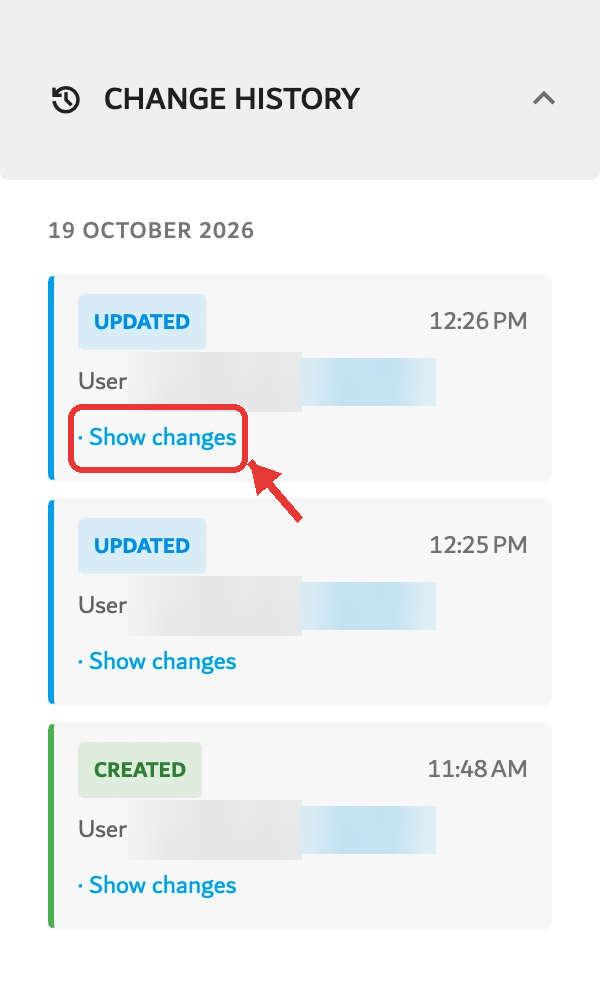
- A comparison panel opens, displaying the before and after state of the product's affected fields side by side

Understanding what is tracked
Product change history records all changes to the product's own data, including:
- Product name, description, and core fields
- Prices and VAT percentages per menu or location
- Allergens, additives, and labels
- Product variants
- Diet assignments and any alternative products assigned to those diets
- Changes originating from automated sources: data imports, AI-generated products, system synchronisations (such as KitchenCut), and admin actions
Each source is identified in the history entry, making it clear whether a change was made manually or came from an automated process.
Understanding the source: manual vs. automated changes
The source badge helps users distinguish how a change entered the system:
- User: A member of your team made the change manually in Menutech.
- Data import: The change came from an external data source (such as a supplier price list or product catalogue import).
- AI generation: The product or product details were created or updated by Menutech's AI assistance features.
- Integration sync: The change came from a connected external system (such as KitchenCut inventory synchronisation).
- Admin: A system administrator made the change.
This distinction is valuable for troubleshooting. If a price appears incorrect, the source badge helps users determine whether it came from a manual error, an import mistake, or an integration sync issue.
Multi-location organisations can use this to ensure consistency and identify which locations are receiving automated updates versus manual input.
Filtering by location
If a user belongs to an organisation but has no location binding, they can filter the history entries to view changes from a specific location:
- In the Change history section, locate the location filter
- Select the location to view only changes made at that location
Limitations
Product change history is view-only; there is no search or export function. Entries display in near real time, though very recent changes may take a moment to appear. The history records who made the change, the source, and what changed, but does not include a reason or note field for each entry.